Arbrea Suite offers a specialized Measurement Tool designed to assist plastic surgeons in obtaining precise breast measurements and volume calculations. This advanced feature is key to improving pre-operative planning and enhancing patient consultations, ensuring accurate and personalized simulations for breast procedures such as augmentation, reduction, or mastopexy.
Calculating the Measurements #
- Open Arbrea Suite and navigate to the Measurement Tool.
- Select the patient’s 3D model or image for analysis.
- The system will automatically generate key measurements, such as breast base width, projection, and symmetry.
- Click on individual measurements to fine-tune and adjust based on specific surgical goals.

Why It’s Important?
- Provides precise anatomical analysis for treatment planning.
- Helps in selecting appropriate implant sizes or surgical modifications.
Calculating the Volume #
- Click on the Volume Calculation Tool in the measurement section.
- The system will automatically estimate breast volume based on the selected area.
- Modify volume simulations to visualize augmentation, reduction, or contouring effects.
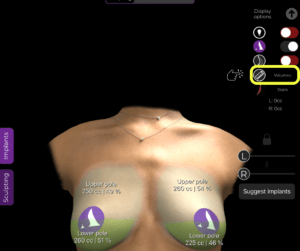
Benefit:
- Helps compare pre- and post-simulation volumes.
- Assists in determining implant sizing and fat grafting requirements.
Switching Between Inches and Centimeters #
Arbrea Suite allows you to easily switch between imperial and metric systems to fit your workflow and patient preferences. To switch units:
- Access the Simulation Dashboard.
- Click on Settings.
- Choose your preferred system: inches or centimeters.
Conclusion #
The Measurement Tool in Arbrea Suite simplifies volume and dimension analysis, ensuring accurate surgical planning and enhanced patient consultations. By utilizing automated calculations, real-time volume adjustments, and detailed dimention tracking, surgeons can optimize pre-operative decision-making.
For more guidance, watch the full video tutorial below.


Responses