Table of Contents
Arbrea Suite allows plastic surgeons to customize the platform’s branding, ensuring a personalized and professional look for patient consultations. With options to change theme colors, upload a clinic logo, and adjust interface settings, this feature helps surgeons align Arbrea Suite with their brand identity.
Starting the Customization Process #
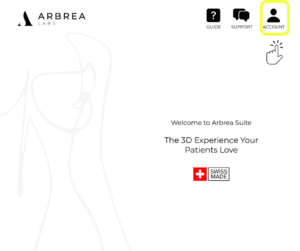
- Open Arbrea Suite and navigate to the Customization Settings.
- Select the Brand Customization section to access personalization options.
Why It’s Important?
- Creates a professional and cohesive brand presence during patient consultations.
- Enhances patient trust by showcasing a branded experience.
Accessing the Theme Colors #
- Click on the Theme Color section in the customization menu.
- Choose from preset color palettes or select custom colors that match your clinic’s branding.

Benefit:
- Reinforces brand consistency across all patient interactions.
Uploading Your Clinic Logo #
- Navigate to the Upload Logo option.
- Select a high-resolution image of your clinic’s logo.
- Adjust the positioning if needed to ensure proper display.

Why This Matters?
- Helps build brand recognition during consultations.
- Adds a professional touch to patient interactions.
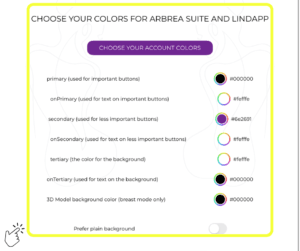
Changing the Colors of Arbrea Suite #
- Customize primary and secondary colors to match your brand’s style.
- Adjust UI elements such as buttons, backgrounds, and menus.
Advantage:
- Creates a unique and professional interface that aligns with your practice.
Saving Your Changes #
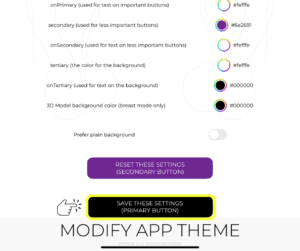
- After making all adjustments, click Save to apply the changes.
- Restart Arbrea Suite to see the customized branding in action.
Benefit:
- Ensures all changes are stored and visible during every consultation.
Conclusion #
This how-to Customize Arbrea Suite to Your Brand enhances clinic branding and patient experience with custom logos, theme colors, and personalized UI settings. By utilizing color adjustments, logo uploads, and branding refinements, surgeons can create a seamless and professional consultation experience.
For more guidance, watch the full video tutorial below.


Responses