Table of Contents
Arbrea Suite provides advanced tools to help plastic surgeons capture high-quality images for complex cases, ensuring accurate simulations and improved patient consultations. By following best practices for lighting, image quality, and simulation settings, surgeons can achieve precise pre-operative planning.
Capturing Quality Pictures with the Right Light #
- Use natural or well-balanced lighting to avoid shadows and glare.
- Ensure the patient’s face or body is evenly illuminated for accurate simulation results.
- Avoid harsh direct lights or overexposed backgrounds that may distort image details.
Why It Matters?
- High-quality lighting ensures precise measurements and realistic simulations.
- Reduces errors caused by poor visibility or shadows.
Ensuring the Best Quality for Simulations #
- Stabilize the camera – Use a tripod or steady hand to avoid blurriness.
- Capture images at eye level for facial cases and neutral positioning for body simulations.
- Use the highest resolution available to maintain detail and clarity.
Benefit:
- Ensures more detailed and accurate AI-powered adjustments.
- Provides better visualization for patient discussions.
Creating a New Patient File #
- Open Arbrea Suite and go to the tabs New Patient & Patient List.
- Click “Create New Patient” and input necessary details.
- Save the file to store patient history and simulations for future reference.

Advantage:
- Keeps patient cases well-organized for easy follow-ups.
- Allows surgeons to track simulation progress and adjustments.
Customizing the Procedure’s Settings #
- Select the type of procedure being simulated (e.g., facelift, breast augmentation, rhinoplasty).
- Adjust measurement tools, filters, and enhancement settings to match the complexity of the case.
- Fine-tune parameters for precise modifications.
Why It’s Important?
- Custom settings optimize the simulation experience.
- Helps achieve realistic pre-surgical previews.
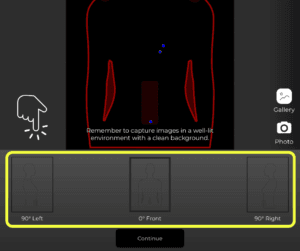
Capturing the Patient’s Pictures for Simulation #
- Take frontal and profile shots for facial procedures.
- Capture front and angled views for body simulations.
- Ensure a neutral posture and expression to maintain accuracy.
Benefit:
- Provides the best foundation for AI-based simulations.
- Enhances real-time visualizations for patient consultations.
Conclusion #
Capturing high-quality images for complex cases in Arbrea Suite ensures more accurate simulations, enhanced patient communication, and improved surgical planning. By utilizing proper lighting, high-resolution imaging, and customized simulation settings, surgeons can achieve precise pre-operative assessments.
For more guidance, watch the full video tutorial below.


Responses