Arbrea Breast offers a powerful Fat Grafting Tool, enabling plastic surgeons to simulate fat transfer procedures with precision. This feature allows for real-time volume adjustments, injection area customization, and fat addition or removal, enhancing pre-operative consultations and patient decision-making.
Selecting an Implant from the Catalog (Optional) #
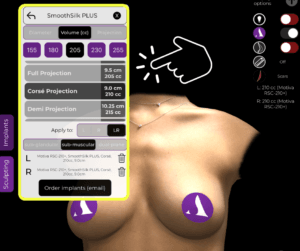
- Open Arbrea Breast and navigate to the Implants Catalog.
- Choose an implant if fat grafting is being combined with an augmentation procedure.
- Filter implants by size, projection, and volume to match the patient’s needs.
Why It’s Important?
- Helps surgeons compare implants vs. fat grafting alone.
- Provides a combined simulation for hybrid procedures.
Applying and Adjusting Fat Grafting Simulations #
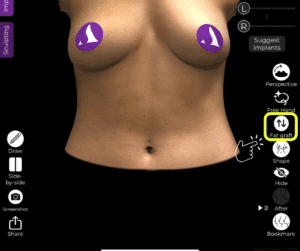
- Select the Fat Grafting Tool from the simulation menu.
- Apply fat transfer modifications directly on the patient’s scanned image.
- Adjust the volume and distribution to achieve a natural result.
Benefit:
- Provides a realistic preview of fat grafting outcomes.
- Helps visualize volume distribution across different areas.
Changing the Injection Area #
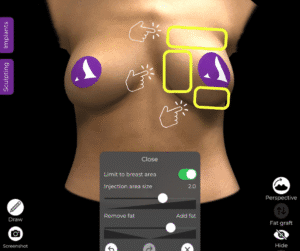
- Click on the injection area selector to modify the placement.
- Drag and resize the area to match the desired fat transfer location.

Why This Matters?
- Allows for customized fat distribution based on patient goals.
- Helps assess potential aesthetic improvements before surgery.
Choosing to Add or Remove Fat #
- Toggle between Add Fat and Remove Fat options.
- Adjust the amount of fat to be added or extracted for precise contouring.

Advantage:
- Enables simulation of both augmentation and reduction techniques.
- Helps patients understand different surgical approaches.
Selecting Where to Apply the Fat #
- Use the tool to designate specific injection sites (e.g., upper pole, cleavage area, or lateral breast).
- Ensure fat placement aligns with surgical plans and patient expectations.
Benefit:
- Improves preoperative planning for fat grafting procedures.
- Helps surgeons and patients visualize potential results more effectively.
Conclusion #
The Fat Grafting Tool in Arbrea Breast simplifies fat transfer planning with real-time volume adjustments, precise injection mapping, and simulation refinements. By utilizing fat addition/removal options, injection area customization, and realistic 3D visualization, surgeons can enhance consultations and achieve accurate pre-operative planning.
For more guidance, watch the full video tutorial below.


Responses